

🌡️ Shelly Wall Display
Perfect temperature sensor for Better Thermostat.
Better Thermostat is a HACS integration that makes your “dumb” radiator thermostats smart. It uses an external temperature sensor, window sensors and weather data to optimize heating and save energy.
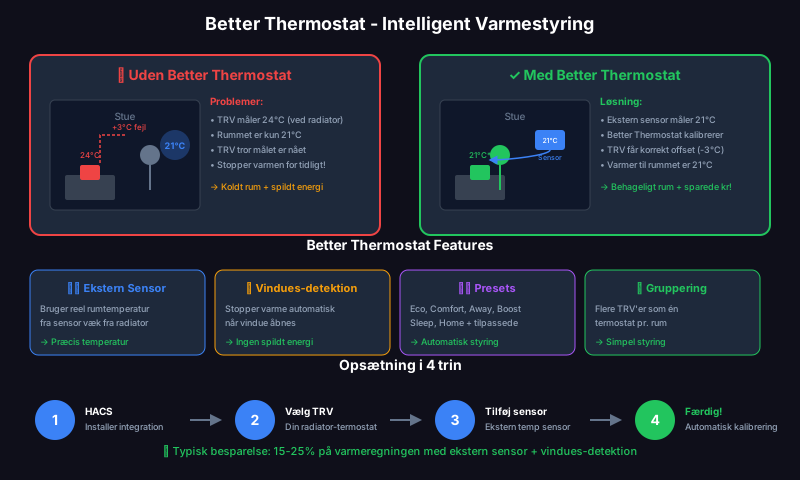
Radiator thermostats (TRV) measure temperature directly at the radiator - which is typically 2-5°C warmer than the rest of the room. Better Thermostat solves this:
| Problem | Better Thermostat Solution |
|---|---|
| Wrong temperature | Uses external sensor for real room temperature |
| Open window = waste | Automatic stop on open window |
| Manual adjustment | Presets: Eco, Comfort, Away, Boost |
| Multiple radiators | Group TRVs in same room |
| Calibration | Automatic offset calibration |
| Component | Examples | Required? |
|---|---|---|
| Radiator thermostat (TRV) | Shelly TRV, TRÅDFRI, Sonoff TRVZB, Aqara | ✅ Yes |
| Temperature sensor | Shelly Wall Display, Aqara, IKEA Vindstyrka | ✅ Recommended |
| Window sensor | Aqara, Sonoff, Shelly | ⭐ Optional |
| Home Assistant | With HACS installed | ✅ Yes |
When creating you need to specify:
| Field | Description | Example |
|---|---|---|
| Name | Name of thermostat | ”Living Room Better” |
| Thermostat | Your existing TRV | climate.shelly_trv_living_room |
| Temperature Sensor | External room sensor | sensor.living_room_temperature |
| Window Sensor | Window sensor (optional) | binary_sensor.window_living_room |
| Preset | Default Temp | Usage |
|---|---|---|
| None | 20°C | Default |
| Eco | 19°C | Energy saving |
| Comfort | 21°C | Home and active |
| Boost | 24°C | Quick heating |
| Away | 16°C | Not home |
| Sleep | 18°C | Night |
automation:  - alias: "Heating: Away when no one home"    trigger:      - platform: state        entity_id: group.people_home        to: "not_home"        for:          minutes: 30    action:      - service: climate.set_preset_mode        target:          entity_id:            - climate.living_room_heating            - climate.bedroom_heating        data:          preset_mode: away
- alias: "Heating: Comfort when home" trigger: - platform: state entity_id: group.people_home to: "home" action: - service: climate.set_preset_mode target: entity_id: - climate.living_room_heating - climate.bedroom_heating data: preset_mode: comfortautomation: - alias: "Heating: Sleep at night" trigger: - platform: time at: "22:30:00" action: - service: climate.set_preset_mode target: entity_id: - climate.living_room_heating - climate.bedroom_heating data: preset_mode: sleep
- alias: "Heating: Comfort in morning" trigger: - platform: time at: "06:30:00" condition: - condition: state entity_id: group.people_home state: "home" action: - service: climate.set_preset_mode target: entity_id: - climate.living_room_heating - climate.bedroom_heating data: preset_mode: comfortBetter Thermostat can automatically stop heating when a window opens:
window_sensor: binary_sensor.window_living_roomwindow_delay: 30 # Wait 30 sec before reactingBetter Thermostat can detect open windows via sudden temperature drop:
window_detection_method: temperature_dropwindow_detection_threshold: 0.5 # °C drop over short timeInstall the matching UI card to see extra info:
type: custom:better-thermostat-ui-cardentity: climate.living_room_heatingeco_temperature: 19disable_window: falseBetter Thermostat automatically calibrates your TRV based on the difference between the TRV’s built-in sensor and your external sensor.
🌡️ Shelly Wall Display
Perfect temperature sensor for Better Thermostat.
📊 LD2410 mmWave
Combine presence with heating control.