

🎯 Start simple
Do one thing at a time. Only add conditions when the basics work.
Now the fun begins! Automations are why we bother with all this. Lights turning on when you come home. Heating turning down when you leave.
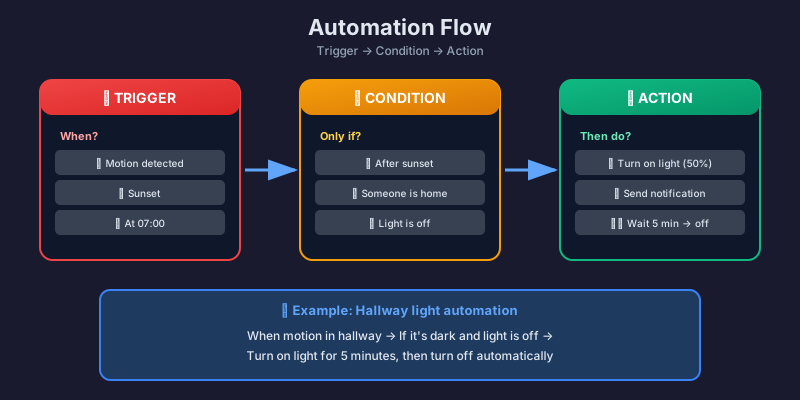
All automations have three parts:
| Part | Description | Example |
|---|---|---|
| Trigger | What starts it | Sun sets, motion detected |
| Condition | Optional check | Only if home, only at night |
| Action | What happens | Turn on light, send notification |
Think of it as: “When X happens, and if Y is true, then do Z.”
The classic first automation!
Go to Settings → Automations & scenes
Click Create automation → Create new automation
Trigger:
Action:
Save with name “Turn on living room light at sunset”
- alias: "Turn on living room light at sunset" description: "Automatically turns on light when sun sets" trigger: - platform: sun event: sunset offset: "-00:30:00" # 30 min BEFORE sunset action: - service: light.turn_on target: entity_id: light.living_room_ceiling data: brightness_pct: 80 mode: single- alias: "Hallway light on motion (night)" description: "Turns on dim light in hallway at night" trigger: - platform: state entity_id: binary_sensor.hallway_motion to: "on" condition: - condition: time after: "22:00:00" before: "07:00:00" action: - service: light.turn_on target: entity_id: light.hallway data: brightness_pct: 20 # Dim light at night - delay: minutes: 2 - service: light.turn_off target: entity_id: light.hallway mode: restart # Restarts timer on new motionRequires smart plug with power monitoring (e.g., IKEA TRETAKT or Sonoff S31):
- alias: "Washing machine done" description: "Sends notification when laundry is finished" trigger: - platform: numeric_state entity_id: sensor.washing_machine_power below: 5 # Watts for: minutes: 3 # Must be low for 3 min condition: - condition: numeric_state entity_id: sensor.washing_machine_power above: 0.5 # Ensures it has been running action: - service: notify.mobile_app_my_phone data: title: "🧺 Washing Machine" message: "The laundry is done!" mode: single- alias: "Low temperature warning" description: "Warns if it gets too cold" trigger: - platform: numeric_state entity_id: sensor.living_room_temperature below: 18 for: minutes: 10 action: - service: notify.mobile_app_my_phone data: title: "🥶 Cold in living room" message: "Temperature has dropped to {{ states('sensor.living_room_temperature') }}°C" mode: single🎯 Start simple
Do one thing at a time. Only add conditions when the basics work.
🧪 Test thoroughly
Use the “Run” button to test actions without waiting for trigger.
📝 Good names
“Turn on outdoor light at sunset” is better than “Automation 1”.
🤔 Think edge cases
What if power goes out? What if someone already turned on the light?
| Trigger | When | Example |
|---|---|---|
state | Entity changes state | Motion, door opens |
numeric_state | Value above/below | Temperature, power usage |
sun | Sunrise/sunset | Light automation |
time | Specific time | Morning routine |
zone | Person arrives/leaves | Home/away |
device | Device-specific | Button pressed |
📡 Zigbee sensors
Add Aqara, IKEA and other Zigbee sensors.
🔧 ESP32 sensors
Build your own sensors with ESP32.