

HA Dashboard Design
Build beautiful dashboards.
Node-RED is a visual programming tool that makes complex automations manageable. Drag nodes, connect them with wires, and build automations that would be impossible (or very tedious) in Home Assistant’s standard automation editor.
| Feature | HA Automations | Node-RED |
|---|---|---|
| Learning curve | Low | Medium-high |
| Visual editor | Simple | Advanced |
| Debugging | Limited | Excellent |
| Loops | ❌ | ✅ |
| Variables | Limited | Flow/Global |
| JavaScript | ❌ | ✅ |
| Reuse (subflows) | ❌ | ✅ |
| Time-based logic | Basic | Advanced |
Use Node-RED when you need:
Stick with HA automations when:
Go to Settings → Add-ons
Click Add-on Store (bottom right)
Search for “Node-RED”
Select Node-RED and click Install
Configure the add-on:
# Important settings:ssl: false # Set to true if you have SSLcredential_secret: "your-secret-key"Start the add-on and enable:
Open Node-RED via the sidebar
# docker-compose.ymlversion: '3'services: nodered: image: nodered/node-red:latest container_name: nodered restart: unless-stopped ports: - "1880:1880" volumes: - ./nodered-data:/data environment: - TZ=Europe/CopenhagenIn Home Assistant, click your profile picture (bottom left)
Scroll down to Long-Lived Access Tokens
Click Create Token
Name it “Node-RED”
Copy the token - you can only see it once!
Drag an events: state node onto the workspace
Double-click and click the pencil icon next to Server
Fill in:
Name: Home AssistantBase URL: http://homeassistant.local:8123Access Token: [your token from previous step]Click Add then Done
For extra features like enabling/disabling flows from HA:
Install via HACS:
Add integration:
┌─────────────────────────────────────────────────────────────┐│ FLOW (Tab) ││ ┌─────────────────────────────────────────────────────┐ ││ │ SEQUENCE (Connected nodes) │ ││ │ ┌──────┐ ┌──────┐ ┌──────┐ ┌──────┐ │ ││ │ │ NODE │───►│ NODE │───►│ NODE │───►│ NODE │ │ ││ │ └──────┘ └──────┘ └──────┘ └──────┘ │ ││ │ msg.payload is passed between nodes │ ││ └─────────────────────────────────────────────────────┘ ││ ││ ┌─────────────────────────────────────────────────────┐ ││ │ ANOTHER SEQUENCE │ ││ │ ┌──────┐ ┌──────┐ │ ││ │ │ NODE │───►│ NODE │ │ ││ │ └──────┘ └──────┘ │ ││ └─────────────────────────────────────────────────────┘ │└─────────────────────────────────────────────────────────────┘| Term | Description |
|---|---|
| Node | A single building block (trigger, action, logic) |
| Sequence | Connected nodes forming one automation |
| Flow | All sequences on one tab |
| msg | Message passed between nodes |
| msg.payload | Default data field in the message |
| Scope | Available To | Use Case |
|---|---|---|
| msg | Only current sequence | Data between nodes |
| flow | All nodes on same tab | Shared data on flow |
| global | All nodes everywhere | Shared data across all |
// Set variablesflow.set("myVar", "value");global.set("globalVar", 123);
// Read variableslet x = flow.get("myVar");let y = global.get("globalVar");| Node | Function | Use |
|---|---|---|
| events: state | Trigger on state change | Start automations |
| current state | Read current state | Conditions |
| call service | Call HA service | Actions |
| wait until | Wait for state | Delays with conditions |
| trigger: state | Trigger with multiple conditions | Advanced triggers |
| api | General API access | Everything else |
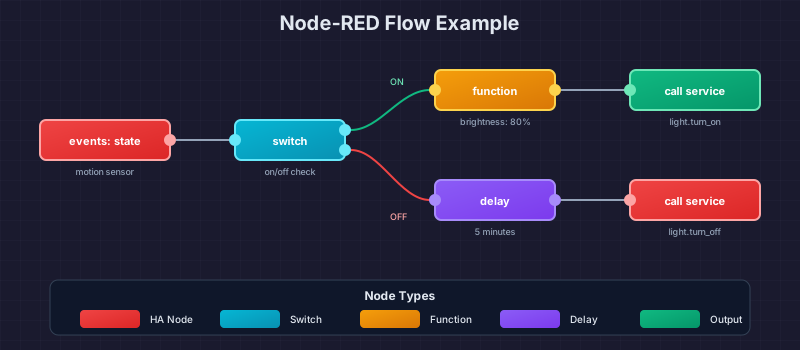
Triggers when an entity changes state:
# Configuration:Entity: light.living_roomIf State: "on" # Optional: Only trigger on this stateFor: 00:00:05 # Optional: Only if state holds for 5 secOutput:
msg.payload = "on"; // New statemsg.data.old_state.state // Old statemsg.data.entity_id // Entity IDRead state in the middle of a flow (doesn’t trigger itself):
# Configuration:Entity: binary_sensor.motion_kitchenIf State: "on"# If state matches → Output 1# If not → Output 2 (or stop)Execute actions in Home Assistant:
# Example: Turn on lightDomain: lightService: turn_onEntity: light.living_roomData: {"brightness": 255, "color_temp": 350}[events: state]──►[call service] motion_sensor light.turn_on
[events: state]──►[delay]──►[call service] motion_sensor 2 min light.turn_off (off)Flow JSON:
[ { "id": "motion_on", "type": "server-state-changed", "entity_id": "binary_sensor.motion_living_room", "ifstate": "on", "wires": [["light_on"]] }, { "id": "light_on", "type": "api-call-service", "domain": "light", "service": "turn_on", "entity_id": "light.living_room" }][events: state]──►[current state]──►[call service] motion sun.sun light.turn_on (below_horizon)The sun entity is used to check if it’s night before turning on the light.
Light that turns off after 5 minutes without motion, but resets if there’s new motion:
[events: state]──►[stoptimer]──►[call service] motion (on) reset (nothing) │ └──────────►[stoptimer]──►[call service] start 5min light.turn_offTurn lights on/off based on which rooms have motion:
// Function node to track active roomslet activeRooms = global.get("activeRooms") || [];let room = msg.data.entity_id.replace("binary_sensor.motion_", "");
if (msg.payload === "on") {    if (!activeRooms.includes(room)) {        activeRooms.push(room);    }} else {    activeRooms = activeRooms.filter(r => r !== room);}
global.set("activeRooms", activeRooms);msg.activeRooms = activeRooms;return msg;Create your own nodes from a group of nodes:
Select the nodes you want to reuse
Menu → Subflows → Selection to Subflow
Name your subflow
The new subflow appears in the palette under “subflows”
Drag it in wherever you need it
Connect sequences across flows without drawing long wires:
Flow 1: Flow 2:[trigger]──►[link out: "alarm"] [link in: "alarm"]──►[action]Test your flows without waiting for real triggers:
[inject]──►[rest of your flow] (manual trigger via click)Configure inject node with test data:
msg.payload = "on";msg.data = { entity_id: "binary_sensor.test", old_state: { state: "off" }};See what’s happening in your flow:
[trigger]──►[debug]──►[action] │ └──► Shows msg in Debug panelTip: Set debug to “complete msg object” to see everything.
Install via Menu → Manage palette → Install:
| Palette | Description |
|---|---|
| node-red-contrib-bigtimer | Advanced time-based scheduling |
| node-red-contrib-stoptimer | Start/stop/reset timers |
| node-red-contrib-weekday | Filter on weekdays |
| node-red-contrib-time-range-switch | Routing based on time |
| node-red-contrib-schedex | Sunset/sunrise scheduling |
| node-red-dashboard | Build dashboards in Node-RED |
# Check:1. All nodes have valid connections2. No red triangles on nodes (configuration errors)3. Server connection is configured4. Access token is validAdd debug node after trigger
Check that entity_id is correct
Verify that “If State” matches
Check Debug panel for output
# Check access token:1. Create new token in HA2. Update server config in Node-RED3. Deploy all flows4. Restart Node-RED add-on| Practice | Description |
|---|---|
| One tab per area | Living room, kitchen, bedroom, etc. |
| Comments | Use comment nodes for explanation |
| Naming | Give all nodes descriptive names |
| Subflows | Reuse logic instead of copy/paste |
# Avoid:- events: all node (uses many resources)- Polling in loops (use triggers instead)- Large debug outputs in production
# Use:- "Modified Flows" deploy type- Specific entity triggers- Disable debug nodes when not in useNode-RED flows are stored in:
# Add-on:/config/node-red/flows.json
# Docker:./nodered-data/flows.json
Include this file in your Home Assistant backup!
HA Dashboard Design
Build beautiful dashboards.
First Automation
Start with HA’s built-in automations.
Last updated: December 2025